September 2026 Update

Presto Product Team
September 30, 2026
September was all about speed! ⚡ We shipped a brand-new command palette, gave you tools to fix a whole column of data in one go, and freshened up the look of Presto. Helpers got some love too, and we squashed plenty of bugs along the way. Let’s dive in!
RosterSync Updates 🔄
- Many schools per organization — On the RosterSync by Campus screens, you can now link one Presto organization to more than one school.
- Smoother ClassLink setup — Fixed an issue where administrators were signed out right after signing in with ClassLink, which kept them from turning on ClassLink rostering.
- Hosted SFTP, on autopilot — Roster files uploaded to Presto’s hosted SFTP are now picked up and processed every night.
Meet the Command Palette ⚡
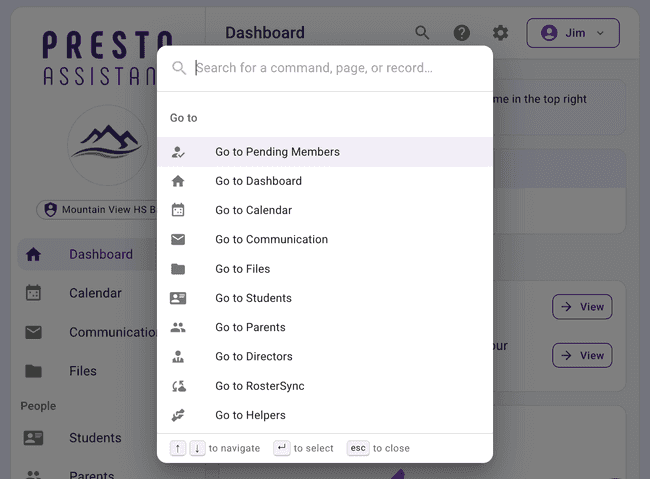
Press ⌘K on a Mac (or Ctrl+K on Windows), or click the new magnifying glass icon in the top bar, and the command palette pops open. Start typing, and you can get to just about anything in Presto without hunting through menus:
- Go to almost any page in Presto
- Act on a student, inventory item, or uniform — check something out, assign a fee or form, add them to a group, send a welcome email, and more
- Create something new — members, groups, inventory, fees, payments, emails, forms, checklists, and lots more
- Run organization-wide actions like Apply All Credits, Approve All Pending Members, or Email Financial Statements
- Search support articles, or reach out to support right from the palette
It’s fully keyboard-friendly, and it only shows the actions you have permission to take. Give it a try — we think you’ll love it!
Fix a Whole Column at Once 🪄
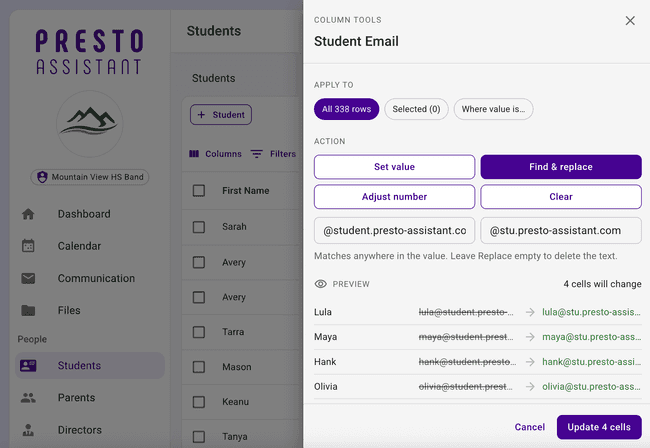
Ever noticed the same typo in thirty rows? Now you can fix the column instead of each cell. Open the menu on a column in the Students table and choose the new column tools to set a value, find & replace, adjust a number, or clear — for every row, just your selected rows, or every row that shares a value. Presto shows you exactly which cells will change before anything is saved.
We also gave table editing some upgrades:
- New names — Edit Mode is now Quick Edit, and Global Edit is now Bulk Edit.
- Dynamic Fields, editable in place — Your district’s Dynamic Fields on the Students and Inventory tables can now be edited right in Quick Edit, and in Bulk Edit too.
- Pinned columns — Pinned columns can now be edited in Quick Edit just like the rest.
- Copy and paste for yes/no fields — True/False fields now support copy and paste in Quick Edit.
- More Bulk Edit fields — Bulk Edit now handles number and date fields, plus a handy dropdown for uniform type.
A Fresh New Look ✨
Presto got a little style refresh! Cards, dialogs, menus, and buttons now have softer, rounder corners, and button labels read in friendly sentence case (“Send email”) instead of shouting in ALL CAPS. Same Presto you know, just a bit easier on the eyes.
Rich Text in Forms 📝
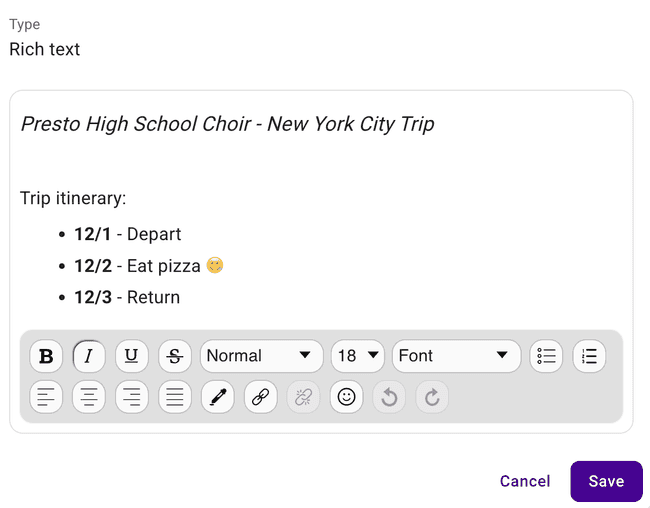
The Paragraph block in the form builder is now called Rich text, and it lives up to the name! You can bold words, add lists, and drop in links, and your members will see the formatting while filling out the form. Your existing paragraph blocks keep working, and the line breaks you typed now show up the way you meant.
Plus, if you try to unassign someone from a form after they’ve already sent in a response, Presto will give you a heads-up first.
Helpers 🤝
- Helpers can see the Helper roster — Helpers can now view the Helpers list they belong to, and they see the dashboard cards that match their permissions.
- Helpers can send welcome emails — Directors and helpers with permission can send a welcome email to anyone who hasn’t gotten one yet.
- Titles, not names — Helpers now show their Title in the organization switcher, and emails they send use their Title as the “from” name.
- Quicker helper onboarding — Helpers no longer get asked for personal info (like name and gender) when they set up their account.
Easier Check-Ins 🎒
- Check in from the student page — The Uniform Checkouts and Inventory Checkouts tables on a student’s page now have a Check In action on each row.
- “Check in all,” safely — To avoid any accidents, you’ll now type “Check in all” to confirm before checking in every inventory or uniform item at once.
Emails 📬
- Canceled means canceled — Canceling a scheduled email now reliably stops it from sending, and you can edit, reschedule, or discard it afterward.
- Reach previous-year members — The Previous Year Members table now has Email Filtered and Email Selected in its More Actions menu, and your emails go to the previous-year members you choose. The email button on an inactive member’s page works too.
- Longer emails — The email composer now allows longer messages and gives you a heads-up as you get close to the limit, instead of failing when you hit Send.
- Welcome emails for approved members only — Welcome emails now only go to members you’ve approved from your Pending Members page.
Payments & Finances 💸
- Receipts after confirmation — Online payment receipts now go out after the payment provider confirms the payment, so no one gets a receipt for a payment that didn’t go through.
- More accurate balances — Fixed a remaining balance that could count a transferred credit twice, and failed payments no longer count toward an item’s amount paid.
- Fewer stuck payments — Presto now checks with the payment provider every night on any online payment still marked as pending, so it gets updated to the right status.
- Clearer card declines — When a Vanco payment is declined, you’ll see the actual reason instead of a generic error.
- Newest payments first — Payments now list the most recent ones at the top.
- Uncategorized items, found — Uncategorized fee names now work with the search bar and show up in CSV exports.
New Support Articles 📚
The Presto Support site has some new reading material:
- Create and Use Checklists
- Unblock Email Addresses
- Create and Publish Admin Forms
- Set Up Automatic Rostering now spells out exactly which roster files your IT team needs to send over SFTP
Other Improvements
Some more updates worth knowing about:
- Know who to ask — When you don’t have a permission, Presto now tells you exactly who can turn it on — including your admin portal administrator’s name and email — instead of a generic message. And the Delete item button on an inventory item no longer quietly disappears; it explains who can grant access.
- Easier permissions in the Admin Portal — The director permissions table is now grouped by campus and organization, with tidier column headers, and you can turn a permission on or off for a whole group in one click.
- No more birthday mix-ups — Parents, directors, and admins no longer get asked for a date of birth during onboarding. Parents were sometimes entering their child’s birthday by accident, which locked their own account into under-13 limits.
- Restore deleted inventory — Admins can now restore selected or filtered items from the Deleted Inventory table in the Admin Portal.
- A friendlier crash page — If something goes wrong, Presto now shows a clearer error page and lets you choose when to reload, instead of reloading on its own and losing what you’d typed.
- Profile page fix — Fixed an endless loading spinner some parents and students saw when switching between editing and viewing their profile.
- Tidying up — We removed the temporary “Apply Credits Has Moved” card and some outdated text from the Payment Review dialog.
Get in Touch
That’s a wrap on September! As always, if you have questions or feedback, reach out to Presto Support at support@presto-assistant.com.
Happy teaching!